
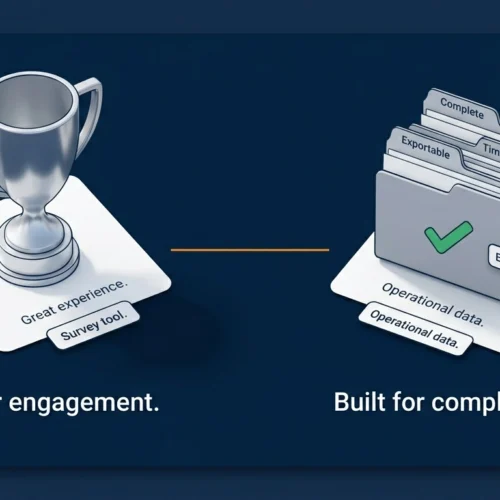
GoPath vs Typeform is not really a close comparison, but it is an important one.
Typeform is one of the most recognisable form tools in the world. It has built a strong reputation on a genuinely good insight: how a form feels to fill in affects whether people actually complete it. That insight is real, and Typeform executes on it well.
The problem is that feeling is not the same as function.
When a letting agent needs complete, timestamped, audit-ready tenant applications, or when an HR manager needs every new hire to submit a full document pack before their first day, the question is not whether the form feels engaging. The question is whether the data came back complete, usable, and retrievable.
That is a different job. And it is the job GoPath was built for.
This article compares GoPath vs Typeform across the dimensions that matter most for operational data collection, not marketing surveys.
What Typeform Was Built For
Typeform’s entire product philosophy is built around one idea: forms should feel like conversations.
Its signature one-question-at-a-time interface reduces cognitive load, makes long forms feel shorter, and genuinely improves completion rates for survey-style data collection. Research consistently shows Typeform achieves completion rates of 40 to 60%, significantly higher than standard multi-field forms on the same questions.
For the use cases Typeform was designed for, this is valuable. Lead generation forms. Post-purchase customer surveys. Event registrations. Quiz-style assessments. Brand research. Any context where you want someone to engage with a form and finish it, where the quality of the experience affects the quality of the data.
Typeform is an excellent tool for this category of work.
The issue is that this category of work is fundamentally different from operational data collection, and Typeform’s limitations become very visible when you try to use it for the latter.
What GoPath Was Built For
GoPath is a structured data collection platform built for one specific purpose: collecting complete, usable, operationally reliable data from multiple people simultaneously.
Instead of optimising for how enjoyable the form experience is, GoPath optimises for what comes out at the end.
Required fields cannot be skipped. Document uploads are collected in the same flow as form fields. Submissions are timestamped automatically and held in a centralised dashboard. All data is exportable to CSV in one click.
GoPath’s template library includes premade forms for the most common operational collection scenarios, rental applications, tenant onboarding flows, HR new hire packs, and contractor document requests, so teams are not building from scratch every time.
The submitter experience is simple and guided. But the design priority is completeness and usability of the output, not the aesthetics of the journey.
That difference in philosophy produces very different tools.
GoPath vs Typeform: Where They Differ
Required Fields and Submission Completeness
This is the most important difference for anyone collecting operational data.
Typeform allows respondents to skip questions marked as optional. More significantly, in practice, even “required” questions can be bypassed depending on how the form is configured and the platform version in use. The format is designed to minimise friction, which sometimes means minimising enforcement.
For a customer satisfaction survey, this is fine. Incomplete feedback is still useful feedback.
For a rental application or an HR onboarding document pack, an incomplete submission is not a partial result. It is a compliance gap. A missing I-9 field. An unverified income declaration. A signature that did not arrive.
GoPath enforces required fields at the structural level. A submission cannot be completed and submitted until every required field is filled and every required document is attached. There is no workaround. The submitter must complete the form; otherwise, they cannot submit it.
For property managers and HR teams collecting compliance-critical information, this is not a nice-to-have. It is the core requirement.
Pricing and Response Caps
Typeform’s pricing is built around monthly response caps. The Basic plan at $29 per month includes only 100 responses per month. Custom branding removal requires the Plus plan at approximately $50 per month. Calculator fields and advanced features require the Business plan at $83 per month. For most small businesses, the effective cost of a usable Typeform plan is $50 to $83 per month, not the $29 headline price.
For operational use cases, response caps create a specific problem. If a letting agent is collecting applications for multiple properties simultaneously, or an HR team is onboarding a cohort of new hires, responses accumulate quickly. Hitting a monthly cap mid-process is not a minor inconvenience; it stops your workflow.
GoPath is $20 per month with no response caps. The cost is the same whether you process 10 submissions a month or 200.
Audit-Ready Records and Data Retrieval
Typeform produces a dashboard and a downloadable spreadsheet of responses. For survey analysis, this is sufficient.
For operational purposes, it is often not enough.
When a deposit dispute surfaces six months after a tenancy ended, or an HR compliance audit requires producing the original signed version of a new hire’s onboarding submission, the question is not whether you have a spreadsheet of responses. It is whether you can produce the specific submission, with its timestamp, in its original, complete form, quickly and without uncertainty.
GoPath’s dashboard organises every submission by submitter, with full timestamps, attached documents preserved, and the complete record exportable on demand. The audit trail is built into how the data is stored, not assembled retrospectively from a spreadsheet export.
Compliance Use Cases
Typeform’s HIPAA compliance and advanced security controls are locked behind Enterprise pricing, which typically ranges from $3,000 to $10,000 per year based on contract data from enterprise procurement platforms. For small and mid-sized businesses in regulated industries, this is not a realistic option.
GoPath is built with compliance-sensitive operational use cases as the primary audience. Property managers are collecting right-to-rent documentation. HR teams gathering I-9 forms and signed policy acknowledgments. Letting agents building audit-ready tenancy records. The tool is priced and designed for teams at this scale.
Template Library
Typeform offers a large library of templates, the majority of which are oriented toward surveys, quizzes, lead capture, and feedback collection.
GoPath’s template library is focused on operational collection scenarios. Rental application forms. HR onboarding document packs. Contractor compliance forms. Move-in checklists. The templates are pre-structured for the workflows GoPath’s users run, not adapted from a general-purpose form builder.
The Data Export Question
Both tools allow data export to CSV. The difference is what that export actually contains.
A Typeform CSV export gives you the form responses, the text fields, the selections, and the ratings. For survey analysis, this is everything you need.
An operational submission often includes attached documents, a payslip, a signed form, and an ID scan. GoPath preserves these as part of the submission record, alongside the structured data. The export is a complete operational record, not just a data table.
GoPath vs Typeform: Side-by-Side Comparison
| Feature | GoPath | Typeform |
|---|---|---|
| Primary use case | Operational data collection | Surveys and lead generation |
| Required field enforcement | Hard gate, cannot submit without completing | Soft, can be bypassed depending on the config |
| Response caps | None | 100/month (Basic), 1,000/month (Plus) |
| Monthly cost | $20 flat | $29 to $83+ depending on features needed |
| Template library focus | Rental, HR, compliance workflows | Surveys, quizzes, lead gen, feedback |
| Audit trail | Built-in timestamped, per-submitter | Spreadsheet export: requires manual organisation |
| Document upload in the same flow | Yes | Limited; file uploads require a paid plan |
| Compliance suitability | Built for SMB operational use | HIPAA requires Enterprise ($3,000+/year) |
| CSV export | One click, complete record | Standard spreadsheet export |
| Best for | Complete, usable operational submissions | Engaging, high-completion survey experiences |
When Typeform Is the Right Choice
This comparison is not a dismissal of Typeform. For what it was built for, it is genuinely good.
If your goal is a customer satisfaction survey that people will actually finish, Typeform’s conversational format delivers measurably better completion rates than a standard form.
If you are running lead generation and the experience of filling in the form reflects on your brand, Typeform’s design quality is a real advantage.
If you are building a quiz, a calculator, or an interactive onboarding flow for a digital product, Typeform’s interface is well-suited to the task.
The right question is not whether Typeform is a good tool. It is whether it is the right tool for the specific job you are trying to do.
When GoPath Is the Right Choice
GoPath is the right choice when the output is what matters, not the experience.
If you are a letting agent collecting rental applications and need every submission to be complete, comparable, and retrievable when a dispute arises, GoPath is built for this. For a deeper look at how the overall listing-to-lease process fits together, the guide on email vs online forms vs structured workflows covers the full picture.
If you are an HR manager running new hire onboarding and need every required document submitted before day one, with a timestamped record you can produce in a compliance audit, GoPath is built for this. The HR onboarding checklist covers exactly what needs to be collected and why the collection method matters.
If you are a property manager, contractor coordinator, or operations lead who collects structured information from multiple people regularly and needs clean, exportable, audit-ready records at a flat monthly cost, GoPath is built for this.
GoPath is $20 a month. No response caps. No hidden plan tiers for the features you actually need. Premade templates for the workflows that operational teams run.
See how GoPath works at getgopath.com
The Bottom Line
GoPath vs Typeform comes down to one question: are you optimising for the experience of filling in a form, or for the usability of what comes out?
Typeform has spent years perfecting the former. The result is a genuinely engaging form experience that produces measurably better completion rates for survey-style data collection.
GoPath is built for the latter. Every design decision prioritises what the submission looks like when it arrives, how complete it is, how retrievable it is, and how usable it remains six months later under pressure.
For marketing teams running campaigns and collecting leads, Typeform is the stronger choice.
For letting agents, property managers, HR teams, and operational leads who collect compliance-critical information from multiple people and need it to hold up, GoPath is the right tool at the right price.
They are not really competing for the same job. But if you have been using Typeform for operational collection and wondering why incomplete submissions and scattered records keep happening, the answer is not that you are using Typeform incorrectly. It is that you are using a survey tool for a data collection job.
Frequently Asked Questions
Is GoPath a Typeform alternative? GoPath and Typeform serve different primary use cases. Typeform is optimised for engaging survey experiences with high completion rates. It excels at lead generation, customer feedback, and quiz-style forms. GoPath is optimised for operational data collection where every submission must be complete, structured, and retrievable. If you are collecting compliance-critical information, rental applications, HR onboarding documents, and contractor records, GoPath is the more appropriate tool. If you are running surveys or lead generation, Typeform may suit your needs better.
Why is Typeform not ideal for property management or HR onboarding? Typeform’s design philosophy prioritises completion rate and experience over enforcement. Required fields can be bypassed, submissions can be partial, and the audit trail is a spreadsheet export rather than a structured per-submitter record. For property management and HR onboarding, incomplete submissions create compliance gaps, and a spreadsheet export is insufficient for producing audit-ready records in disputes or compliance reviews. GoPath enforces completeness at the structural level and maintains a timestamped, organised record of every submission.
How does GoPath’s pricing compare to Typeform’s? GoPath is $20 per month flat, with no response caps and no feature tiers for core functionality. Typeform’s usable entry point for most businesses is $50 to $83 per month once branding removal, required features, and adequate response allowances are factored in. Typeform’s HIPAA-compliant Enterprise tier starts at approximately $3,000 per year. For small and mid-sized operational teams, GoPath’s pricing is significantly more accessible.
Does Typeform enforce required fields? Typeform allows form creators to mark fields as required, but the enforcement depends on form configuration and the platform version. The tool’s design philosophy prioritises reducing friction for the respondent, which in some configurations means required fields can be navigated past. GoPath enforces required fields as hard gates: a submission cannot be completed or submitted until every required field is filled and every required document is attached.
Which is better for compliance document collection, GoPath or Typeform? For compliance document collection in regulated industries, GoPath is the more appropriate tool. It enforces complete submissions, maintains timestamped audit records, and is priced for SMB operational teams. Typeform’s compliance-grade features, HIPAA, SSO, and advanced audit controls are locked behind Enterprise pricing that typically starts at $3,000 to $10,000 per year, making it an impractical choice for small and mid-sized businesses with compliance requirements.
Can Typeform be used for rental applications or HR onboarding? Typeform can technically be configured for rental applications or HR onboarding flows. The limitations surface in practice: incomplete submissions cannot be reliably prevented, file uploads require paid plans, the response cap can disrupt operational workflows during busy periods, and the audit trail is a spreadsheet rather than a structured per-submitter record. These are not insurmountable issues for low-volume or informal use, but they create meaningful operational and compliance risk for teams running these processes at scale.